








If you’ve been around these parts for awhile, then you’re probably aware that I.am.obsessed.with.Pinterest.
But not in the way you might think.
I don’t use Pinterest to find a recipe for dinner (well, sometimes). I don’t use it to scout out new DIY projects. Basically, I don’t use Pinterest in the way that most people think you HAVE to use Pinterest.
Because get this: Pinterest is one of the most underutilized, yet effective marketing platforms out there right now. And not enough people are using it to grow their blog or business. Oh, the humanity!

By using Pinterest strategically, I was able to double my website traffic (in three months) and exponentially grow my email list.
Before utilizing my Pinterest strategies, I had about 2,000 subscribers. 12 months after implementing my strategic Pinterest system, I was up to 40,000 subscribers. Now, after 2 years, I’m nearing 200,000 subscribers! It’s kind of insane.
And this new surge in traffic and subscribers rapidly grew my business, too. Within one year of using my Pinterest strategies, I literally 5x-ed my revenue! Seriously, Pinterest is my secret weapon, and now I want to make it yours, too.
In this article, I’m sharing three essential Pinterest strategies that will help you turn this often-neglected platform into your own marketing powerhouse (no matter which niche or industry you’re in).
Ready to get started with the 3 essential Pinterest strategies? Let’s do this.
And by the way, if you’re on the go, then here’s an audio version of this blog post, which you can listen to and download!
1. Create a profile that attracts the right people
When you initially create a blog or business, what’s the FIRST thing that most experts tell you to do?
Figure out who your target audience is.
(More info on how to do that here).
Your Pinterest account is no different.
One of the common mistakes people make on Pinterest is that they don’t tailor their profile and content to their target audience. If you want to see big results on Pinterest, then you’ll need to create an account that is specifically designed to attract the RIGHT people.
Here’s how…
First, start with your bio area. In this area, you’ll want to implement three things:
- A brief bio that explains who you help, how you help them, and gives people an opportunity to opt-in.
- An on-brand, friendly photo.
- Keywords in your profile name.
Let’s go into more depth on these concepts.
In the actual text of your bio, you shouldn’t make it all about you. Before people will care about YOU, they will care about how you can help THEM. Here’s a quick formula you can use:
I help (who do you help?) do/become/learn (what do you help them with?).
Easy, right? (Read about people who’ve experienced fast & notable results from these strategies!)
After that sentence, which already has your profile visitors engaged in what you do, you want to entice them with a call to action. A call to action is simply a way for them to DO something, like opt-in to your email list. I like to direct them to some sort of freebie I offer, like a free email course, webinar, or PDF download.
Now let’s chat about your profile photo. In this case, I recommend heading out into some natural light and taking a smiling photo of your mug. You don’t need fancy camera equipment to do this as most cell phone cameras + good ol’ sunshine will do the trick.
Lastly, you should add keywords into your profile name. This way, your profile has a higher likelihood of popping up when someone searches for one of those keywords on Pinterest, or even Google.
For example, I create content for entrepreneurs and bloggers, so my Pinterest name says, “Melyssa Griffin | Entrepreneur + Blogging Tips.” That way, if someone searches for one of those topics, I have the chance to appear in their search results. Also, it makes it super easy for people to see what I’m all about when they land on my Pinterest profile.
Bringing it all together, here’s an example of my Pinterest profile, with all of the above in place:
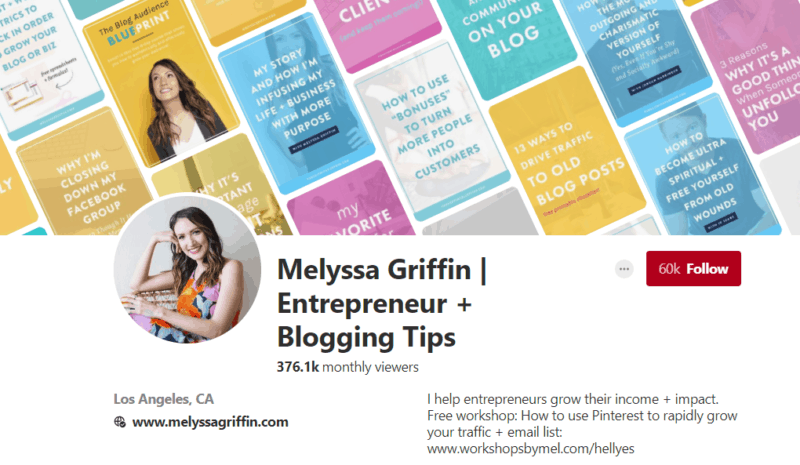 Ultimately, by creating a strong Pinterest profile, we’re making sure that when the RIGHT person visits your Pinterest account, they stick around.
Even if you have a small Pinterest following right now, there are probably HUNDREDS of people who view your profile each month. Do you want those people to see your profile, immediately resonate with what you do, and hit “follow,” or do you want them to be confused and peace out?
The answer to that question is why your profile is so important.
Want a free guide + workbook to help you get the most out of Pinterest? Right here, yo:

Implement Pinterest SEO
Once you’ve created a sweet profile on Pinterest, it’s time to dive into the BIG stuff, like implementing Pinterest SEO.
Pinterest S-E-whaaaat?
A lot of people lump Pinterest in with other social media platforms, like Facebook and Instagram. But Pinterest is far from being a social media site! Instead, Pinterest is a search engine, like Google.
Since Pinterest is a search engine, we HAVE to implement Search Engine Optimization, or SEO. SEO is a fancy term that essentially means “optimize your content so that it shows up as one of the first posts in search results.”
If you go to Google right now and type in a word or phrase, you’ll get a list of articles and websites you can read, which are meant to be ranked in order of their helpfulness and relevance to the topic you searched for.
Pinterest acts in the EXACT same way. That Pinterest feed you see? It didn’t happen by mistake. Pinterest uses an algorithm to rank its pins in an order that they think will be most relevant to their users.
Because think of it this way: if you log in to Pinterest and your feed is full of tons of pins that are irrelevant to you and your interests, what will happen?
Eventually, you’ll stop using Pinterest.
And if people stop using Pinterest, then Pinterest loses money, users, investors, and eventually their entire brand. So it’s in their best interest to use algorithms that show you content they know you’ll love.
What does this mean for you? It means you have to ensure that Pinterest is ranking your content in their feed (and preferably in one of the top positions – where you’ll find your new clients!)
For example, when I logged into Pinterest and looked at my feed, these were the posts at the very top:

These posts are ranking higher than posts at the bottom of my feed (after I scroll down) and will therefore get more repins and click-throughs. (And actually, at least one of these people took my Pinfinite Growth course!).
Alright, alright. You get why Pinterest SEO makes such a monumental difference, but how can you apply it to your own pins and account? Let’s dive in.
1. Create boards that your target audience wants to follow.
On your blog, you probably have “categories” to organize your content. If you’re a travel blogger, would you have a category on your blog for “gluten-free recipes”? Probably not.
Same goes with Pinterest.
So, remove any boards that are irrelevant to your ideal audience and add new boards that your target peeps would be searching for. Overall, I recommend having at least 20 boards on your profile.
Warning: If you delete an entire board, it will also delete any followers who are just following that particular board. Don’t freak out, k? It’s okay to lose followers that aren’t interested in your main message or niche.
Plus, by narrowing your focus on Pinterest, you’re only going to attract MORE of the right followers (and usually much more quickly, too!). Creating boards that are very specific for your core topics will help you reach your ideal audience so.much.faster and help your pins gain momentum, so they take off like wildfire!
2. Add keyword rich descriptions to your boards.
Don’t leave those board descriptions blank, my friend! This is a valuable spot for you to add keywords that your peeps on Pinterest would be searching for. Take a look at the addition of keywords in the board description below:
 This is important for a few reasons. First, your boards themselves can rank on Google. This means that if someone types a phrase into Google, your PINTEREST BOARD could pop up as a top search result. Whoa! That could equate to tons of new followers, website visitors, and email subscribers.
Second, on Pinterest, users can sort by “boards” when they search for something. By adding a keyword-rich, conversational description to your boards, you’re increasing the likelihood that YOUR board will rank in those results.
So what the heck is a conversational description? See the image above for an example. 🙂 Include and incorporate a few keywords in a natural way to give potential followers an idea of what you’ll be pinning on a regular basis (PS – I explain how to automate a lot of this below with Tailwind!)
3. Add strategic descriptions to your pins.
Perhaps most important of all is to SEO the heck out of your pins themselves. Your pins are really the gateway to the rest of your brand, so they require the most effort.
Here’s what to do…
On every pin that you share from YOUR website, you should write a keyword-rich description.
I don’t recommend that you write or modify other people’ descriptions for a few reasons. First, whoooaaa. It takes a lot of time and that time would be better spent working on your business. As they say, “stay in your own lane” and focus on optimizing your pins, while letting other pinners optimize theirs as they deem appropriate.
Whether you write descriptions for the other stuff you pin or not, writing descriptions for YOUR content is totally necessary.
What do you include in this description? Keywords.
Let’s break it down.
One of the MOST important principles of SEO is to use keywords to attract the right people. What would someone be searching for in order to find this particular pin? Make a list of 5-10 long-tail keywords, then add the best ones into your pin’s description in a conversational way.
“What’s a ‘long tail keyword,'” you ask? Well, it’s a keyword that’s at least 2-3 words long. See, if you fill your pin descriptions with general terms like “fitness” and “healthy” then you’re competing with the millions of other people using those simple terms.
Plus, when people search for things on search engines, they rarely search for general words. Instead, they come to search engines with specific problems that they want to solve, which means that they use specific, descriptive keywords to find the right information.
You should, too.
So, if you were pinning a piece of content about “How to Become a Vegan in 5 Simple Steps,” then your keywords wouldn’t be things like “vegan” or “vegetarian.” Too general. Instead, you might use words like, “How to Become a Vegan” or “Easy Vegan Recipes.” Remember: use the types of phrases that your audience is searching for.
Not sure what people are searching for on Pinterest? Well, luckily Pinterest makes this really easy for you to figure out! Simply pop over to Pinterest, type in some of your general keywords (like “vegan”), hit ‘enter’ and see what Pinterest suggests!

For example, in the image above, Pinterest suggested terms like, “Vegan Lifestyle” and “Vegan Recipes.” You could even go a step further (to make your keywords even more specific) and then search for those terms (like “Vegan Lifestyle”) to see how Pinterest can make them even longer by offering more suggestions.
Once you have 3-4 excellent keywords/phrases, create a conversational description that includes them and invites the reader to click through!
Here’s an example of a kick butt description:
“Are you considering going vegan but you don’t know where to start? I’ve created a simple guide to help you become vegan in 5 easy steps! I’ll share with you my favorite easy vegan recipes so that you can start cooking delicious vegan food instantly! Read the article to learn them and start your vegan journey on the right foot! #veganfood #vegan #easyveganrecipes #govegan”
Now you’re probably wondering… “oooh… hashtags!”
Yep. Hashtags are your friend on Pinterest! 🙂 Be sure to include 4 or 5 researched hashtags for every pin! Hashtags recently returned to Pinterest and you should be using them. Why? Hashtag feeds are ordered chronologically, which means that your pins can be seen by many people when you first pin to them. Just like I’d tell ya for Instagram, be strategic. Choose hashtags that are moderately active and not toooo popular, or else your pin will be pushed down the feed before anyone gets to see it.
Bottom line: Think of hashtags as a short-term sprint providing a quick win, and SEO as a marathon. Hashtags will give your pins a ton of traction in the first day, but will quickly dissipate once the pin is pushed down the feed. SEO gives your pins traction in the long run and if your pin ranks high in search results, it could drive traffic to your site for years to come. Woohoo for long-term wins!
Keyword rich conversational descriptions + researched hashtags = success.
See, if your pins utilize keywords, then you drastically increase the likelihood that your ideal audience will see your pin when they search for something on Pinterest.
Pinterest also has something called “picked for you,” which are pins that Pinterest literally picks for you, based on your interests, and pops into your Pinterest feed. If you DON’T use keywords people are searching for, then it will be hard for Pinterest to find your pins and recommend them to people who may become loyal followers after seeing your pin as a “picked for you” article.
So, bottom line for Pinterest SEO?
- Create boards that target your ideal audience. The more specific, the better.
- Add keyword-rich, conversational descriptions to your board descriptions.
- Add strategic keyword-rich, conversational descriptions to your pins themselves and include up to 5 researched hashtags.
And our third and final essential Pinterest tip is…
Schedule content to your Pinterest account (and how to with Tailwind)
Now that things are rockin’ and rollin’, you want to create a system where you are regularly sharing content on your Pinterest account. Here are a few pointers to get you started:
I personally use and love Tailwind.
On Tailwind, it’s very easy to schedule new pins to your boards.
When scheduling, I recommend including a mixture of your own content and other people’s content. Oftentimes, if you’re not seeing much traffic from Pinterest, it’s because you’re not pinning enough of your own stuff.
You should pin between 20 and 30 pins per day (even fewer if you want!). Aim for at least 50% of your own content and 50% others’.
If you’re starting out and don’t have much content of your own, you can start by pinning more from others.
Important: You may discover that some of your pins fit multiple boards (which they should!) So be sure to use Tailwind’s “Interval” feature to space them out at least 3-5 days each, so they don’t get scheduled to 4 or 5 boards at the same time. This will help prevent your account from getting flagged as spam.

Why does consistent pinning help you get ahead?
Well, not only are you putting your content in front of new users on a daily basis, but you’re also pumpin’ up your Pinterest SEO. Whether you’re utilizing SEO for Google or for Pinterest, one of the most common “laws” of SEO is that you should regularly share great content.
By pinning content to your boards on a daily basis, you’re increasing your chances of having your pins appear at the top of someone’s feed (which will eventually lead to more followers, traffic, and subscribers!). *fist bump!*
If you implement these three concepts on Pinterest, you will be well on your way to a growth spurt for your brand.


















Hey Melyssa,
Thanks for posting this – it was a very timely reminder that I’m seriously in need of a board cleanse. I’ve been participating in too many pin-for-pin share groups and my account has lost focus as a result of pinning too many off-brand things.
Also, I love your tips about SEO. It literally blew my mind the first time I heard you talk about it in connection with Pinterest 🙂
Sharing this post 😀
Cath
Yay! I’m so glad this post was a helpful reminder for you, Cath! Thanks for sharing and please let me know if you need help with anything at all 🙂
My blog is less than a month old, so I’m curious how I would get to the “20% my content” level? Is duplication ok?
Hey Brianna! Yes and no about duplication. Technically, duplicate content is not ideal, BUT whenever I add duplicate content (and especially by adding my content to multiple boards), I notice more traffic. And your followers will generally never notice duplicate content since Pinterest’s algorithm filters out the duplicate posts or saves them for later.
So bottom line: I think the pros of duplicate content outweigh the cons. Though, since you’re starting out, you may want to aim for more like 10% of your own content and just start building an active Pinterest account so that when you do have more content to share on Pinterest (from your site) it gains traction more quickly since you’ve been putting the effort into growing your account already. 🙂
Got it! I bit the bullet and bought PInfinite Growth today. I’m ready to rock it on Pinterest and gain some traffic to my site 🙂
Thanks for the wonderful Pinterest Tips Mel.
I’m getting addicted to that platform too and most of my entire day is spent on Pinterest. Could use these tips.
Hey, I sent you an email earlier? Your email wizards haven’t delivered it to you probably. Right? That’s why I’m not back in your group right? Cause I got kicked out without doing anything or right after commenting on a post you commented on.
Could this get a fix? I’d love to keep being a member of the group.
I found this so helpful! I’m going to go and have a good sort out of my Pinterest boards right now!
Awesome! Good luck, Ellie! 🙂
Thanks so much for this post Melyssa. This is honestly the most informative article I’ve read on Pinterest for bloggers!
Wow, that is such a nice compliment! Thanks for the kind words, Zoe 🙂
Hi Melyssa,
Again a great post. Scheduling is definitely one of those things that absolutely nobody should be on the fence about. I’ve found it’s the only way to consistently grow your Pinterest profile.
I’ve only had my profile setup for 2.5 months, but I’ll probably hit 700 followers by the end of the month and I know that wouldn’t have happened with me manually pinning things.
I use a combination of BoardBooster and TailWind in a weird Frankenstein setup because they both have their pluses and minuses so I try to get the best out of both.
I think another important point you make is about constantly pinning your own content. As someone that started their Pinterest profile the same time they launched their site it can feel a bit icky because you don’t have much content to post at first so what I’ve done is created 10 different image templates for each blog post.
That means I’m not flooding my boards with the exact same pins and keeps things fresh on group boards.
Finally (stop talking, Scrivs), I recommend everyone go on the hunt for group boards relevant to your blog. You can grow your profile with the above strategies but if you want to go into outer space then group boards are the way to go.
Thanks for sharing these great tips, Melyssa!
Love that tip about creating different images for each blog post! I’ve told some of my students who don’t have much content to try that, too, but haven’t heard of anyone creating 10 different versions! Very cool idea. Have you seen an increase in traffic by doing that?
Melyssa,
That’s hard to say since I’ve been using Pinterest for my blog since I launched it June 1st. In that sense traffic has gone up every month.
The main reason I did it was because I wanted to experiment with different Pinterest layouts and designs to see which ones were most effective. Over time I’ve narrowed it down to 6 main designs, but I still do 10 in case I need to go back to the reserves.
The second reason why I created these different designs is because I don’t have many posts to share on Pinterest and I wanted a way to continue to recycle the posts in my group boards without looking like I am pinning the exact thing over and over again.
For example, in Boardbooster I’ll use the campaigns to send a pin to my group boards morning, afternoon, and evening. However, each time period gets a different pin design assigned to it.
So my schedule for my latest blog post might look like this:
Day #1 – Morning: Group Board A, Pin Design A
Day #1 – Afternoon: Group Board B, Pin Design B
Day #1 – Evening: Group Board C, Pin Design C
Day #2 – Morning: Group Board B, Pin Design A
Day #2 – Afternoon: Group Board C, Pin Design B
Day #2 – Evening: Group Board A, Pin Design C
This way my new pins are flowing across my group boards without looking as though I’m spamming the same thing. Then when I’m done with that rotation (takes 20 days since I’m in 20 group boards) I can setup the other 3 pin designs and start the cycle all over again.
So some bloggers that have 120 posts and 1 pin each is the same thing as me having 20 posts and 6 unique pins for each one.
For those that don’t have BoardBooster sorry if this is confusing lol.
As I’m sure you know, to get people’s attention it’s all about repetition so if they keep on coming across the same post, but in different pins, I’m hoping that makes them think it will be worth clicking over.
I’m sure if I had a blog for a couple of years and was just now going back and adding pins to each of my posts I probably wouldn’t do the 6-10 image strategy due to how much time it would consume. But now it takes me about 2 minutes to create and export the 6 pins I always use so it isn’t a problem at all.
Great tips, thank you for sharing!!
Question — what is the best strategy to repin old content into the same boards without their being a backlog of duplicate pins?
BoardBooster will actually delete your duplicate pins for you, so that there aren’t a lot of duplicates on your boards. 🙂
As someone that has been a pinterest user right from the start (all the way back in January 2010) I am upset with myself for not utilising this powerful tool for my blog sooner. I have referred to pinterest for some inspiration, instead of utilising it as powerful social media tool.
Thank you so much for your article, I am eager and super keen to change my pinterest strategy and your blog post has been a blessing in the sky!
Jb
velondonista.com
Better late than never 😉 Pinterest is still growing every day so you’re diving in just in time. Best of luck and please keep us posted on your progress!
This is so helpful.Thanks so much!
Yay! I’m so glad you liked it, Alaya 🙂
Wow I did not know Pinterest was so SEO savvy. Def had no clue you could schedule pin. Thanks for the simple and easy to implement tips.
Happy to help! Pinterest is my bread and butter. 🙂
I agree with what you’ve said here except for you’re profile title. With the new changes at Pinterest your blog name or tagline should now come before your name. It’s all people will see when searching, especially from a follower page. Thanks for the great tips.
Thanks for the tip, Debi! Best of luck and please keep me posted on your progress 🙂
This is so helpful! Most of my website traffic comes from SEO and Pinterest, so I really want to invest time on having a better Pinterest account. Thanks for all these! 🙂
I gotchu, Liz! Best of luck and let me know if you have any questions 🙂
This is brilliant. Thanks for sharing your knowledge with us.
So glad you liked it! Thanks for letting me know 🙂
Hi Melyssa – another great article, thanks for the information! I had put descriptions with keywords in my boards, but hadn’t thought of just using a list of kws – I’ll go start changing them, give it a try.
Do you have any tips for repinning other people? Should we aim to repin pins that already have a high count (so you know it’s popular)? or do you think that matters?
I try to look for some each day that already have 1000s of pins. Some I’ll repin directly from Pinterest, others I’ll follow to the blog post and pin from the post. I don’t know if it matters, but I feel like mixing it up is probably/maybe a good thing to do? 😀
Ohh that’s an interesting thought! I can’t say for certain if the repin count matters, BUT if it already has lots of repins, it may be a topic that lots of people are interested in, which could mean that it will get more repins on your account, too (and getting repins yourself is a factor in Pinterest’s algorithm). Sounds like you’re onto something! 😉
Thank you Meylssa. I am new to blogging, and this has been a great education for me. You have answered so many questions, even ones I didn’t know I had.
Oh, that is amazing to hear, Candice! Very glad to help. 🙂
Wow! Thanks so much Melissa! I’ve been pinning for quite some time now, but it seems like I was doing most of it wrong! haha
So excited to implement your tips – let’s see how it goes!
Tatjana xx
fashionartista.com
Ha, I was definitely in your shoes about two years ago on Pinterest. I get it! But I’m glad these tips were helpful. Best of luck, Tatjana! 🙂
Thank you Melissa, I’ve slowly started implementing some of your tips like changing the profile description and adding some SEO… now it’s all about consistent pinning, which is the biggest challenge for me 🙂 But I’m pretty excited!
I need to add keyword descriptions to all my boards–great tip!
Yes! Implementing keyword descriptions will be a big game changer for you! 🙂
Can I just make my recipe boards secret or do they have to go away? I love my recipe boards!
Yes, just make them secret! There’s no need to lose those delicious recipes! 😉
I’ve been hesitating (okay, I won’t lie – I’ve been a little lazy) about scheduling pins, but this was the kick in the rear I needed! Definitely checking out BoardBooster. As always, thanks for the great content, @MelyssaGriffin:disqus!
You’re going to LOVE BoardBooster! Best of luck, Brenda, and please keep me posted on your progress! 🙂
Melyssa, I L-O-V-E pinterest too! Honestly, its what grew my first blog from 150 to 10,00 views in just 2 months. I wanted to do things even better with my new blog and I love these tips. I totally didn’t know that the keywords were so important for the board descriptions! Thanks for sharing these strategies 🙂 Also, I am really loving Tailwind! It helped me schedule an entire month + beyond worth of pins in just about 40 minutes. It is awesome.
That is some amazing growth! Keep up the great work, Kendra! 😀
Thanks so much for this post – I have a long way to go with ‘learning’ Pinterest (though I am trying!). I didn’t realise adding keywords and descriptions to every board was necessary but I’ve just gone and done exactly that for all 22 of my boards. I’ve also re-done my profile as per the advice above. 🙂
I’m so glad this post was helpful for you, Emily! Best of luck and please keep me posted on your progress 🙂
These are amazing tips! I’ve recently started blogging, but I’m a social media specialist full-time and definitely know the power of Pinterest! A scheduling tool that I love to use is Buffer! It’s what I use to schedule all my social content!
Buffer is an awesome tool! Thanks for sharing, Karley! 🙂
I’m searching such pinterest creative strategies and i have also need all others social media activities strategies , Thanks .
You recommend Board Booster over Tailwind? I thought that Tailwind was a Pinterest verified APP while Board Booster may come off a bit spammy? I just started using Tailwind not sure what I think yet.
They both have their pros and cons but I really love BoardBooster for its looping capabilities. Good luck! 🙂
Great stuff Melyssa. You’ve got me switched on to Pinterest now. I’ve been online for years and virtually ignored Pinterest. Now I can see how important it is to my business I’m going to be all over it. Thanks Melyssa.
Awesome news, Trevor! Best of luck and please keep me posted on your progress. 🙂
What a great post! I have not been using Pinterest much, so this afternoon, after reading your blog, I revamped my entire Pinterest and created different boards for the different business ventures I have. I will now incorporate pinning into my regular social media scheduling! Thank you for sharing your tips!
Awesome! Way to take such quick action, Sarah! Best of luck and please keep me posted on your progress. 🙂
These tips were amazing! Just going through my boards I found a number of them that I had somehow wrongly categorized and had lackluster or no descriptions! I’ve gone through and polished these up, along with my profile. I will be working on polishing up the descriptions on the posts of my content as well. Thanks so much for sharing! I can’t wait to see the difference. 🙂
Way to take action on these tips, Tasha! I hope they work well for you and please keep me posted on your progress. 😀
Melyssa,
Do the pins that you pin to “secret” board affect the algorithm in any way?
Nope! The pins that are looped from your secret boards will appear as if they are normal pins and won’t affect the algorithm. 🙂
Thank you so much! I have revamped my pinterest account. Quick question, what do you think about deleting pins. I’ve heard about people strategically doing this. Thanks again!
Yep! You can delete pins that are no longer relevant to your brand so that your branding can be more consistent. 🙂
Just watched your webinar last week and it was such a help with information about Pinterest! You’re truly an inspiration to new bloggers like myself!
Thanks so much for the nice words, Eden! Best of luck with your new blog and please keep me posted on your progress. 🙂
Thanks again for this nice article. Somewhere in this article you advice on freebie offer. As a graphic design company what can I offer as a freebie for my customer?
You can offer lots of different things! For example, you can provide a short checklist of graphic design elements that every website should have, you can give away a small set of free graphics (such as icons), and you can also give away a free site review to provide feedback on the graphics. Good luck!
Also, you could build and offer a course or a cheatsheet of how a design process should go, what to expect from a designer, what to prepare upfront. If I’m on the search for a designer I would find that advice very useful. So, value + trust!
Thank you for these tips Melyssa! Going to get right onto the SEO part of it all and making sure all our content is on Pinterest!
Woohoo! Best of luck to you and please keep me posted on your progress. 🙂
Rewrite my Profile and redo my first board as my blog post board.
Awesome! Good luck to you, Larramie! 😀
Hi Melyssa! Thank you so much for the article! How many times do you recommend pinning and repinning a day if you’re using a scheduler like Tailwind? Thank you!
Hi Molly! I’m not too familiar with Tailwind as I’m more of a BoardBooster girl but I recommend scheduling pins to go out multiple times per day. 🙂
I love your tips but Im guessing these instructions may not be for blogs that are more “journey with me” type of blogs. For instance my blog is about my journey to being committed to dating God’s way & insisting the use of journaling through the process (online and/or physical journals)…of course I will give tips on whats working for me & encouragement however I don’t have a product to sale (except maybe a tshirt idea lol) or coaching to offer… the most money I can make from a blog like this, I’m assuming, is through Amazon affiliate from my book recommendations. Am I right in my assumption? Thanks
It’s hard to say without knowing your brand/audience at all but many affiliate marketers use Pinterest successfully to send traffic to their website so that their affiliate commission grows. The more people you have on your website, the higher the chance that people would buy through your affiliate link, right? 🙂
I would have to figure out how to use these strategies for non-lifestyle-ish blogs 🙂 thanks for your response
This is such great info! I’m already re-writing descriptions and pinning my content to more than 1 board. Thank you!
That’s great, Terri! Good luck to you and please keep me posted on all of your progress. 😀
These tips are so valuable, Melyssa! Would you suggest using an existing account that already has around 600 followers? I use Pinterest a lot in my personal life as well, so I’m a little torn about revamping my boards to solely reflect my travel blog. Any thoughts would be appreciated! 🙂
600 is a great following! Are those 600 followers part of your ideal audience though? If not, I would recommend starting fresh with only relevant content for the people who do want to consume your travel blog related content. Good luck!
First, I just signed up for the webinar! Second, I guess I will go create a Pinterest account for my business, BeMyShopper….Question…will this work for my Grocery Concierge service that I run in my hometown, Destin, FL?!
Hey Kevin! I’m not exactly sure what your business is about but if you can create effective Pin images for what you do, then there’s no reason why it won’t work for your business. 🙂
I will definitely give it a shot! My “customers” order their groceries from my website prior to vacationing in our town…we shop and set the groceries up in their rental house before they check in…so they walk in and it’s ready to go!
I have a question. You say to pin your content daily. What if you don’t make a new pin every day? I mean, you don’t want a board full of the same exact pin. I’m a little confused on this. Do I repin the same pins to the same boards? Could you elaborate? Im sorry if I sound stupid.
You can and should also pin other people’s content to your boards too. This way you can keep fresh content moving while also having a good variety in your boards. Good luck! 🙂
I need to reevaluate the boards I have and decide if they help or hinder my brand. (I’m still having a little trouble with the brand thing…)
It can definitely be a bit difficult to narrow down which boards are going to be the most relevant and effective for your brand but it really does make all the difference. Good luck, Suzi! 😀
Thank you, Melissa!
This is so good. Loved it. 🙂
Thanks, Dan! I’m so glad you enjoyed it. 😀
This is awesome! Thank you so much!
You’re welcome! I’m so glad this was helpful for you, Karoline. :
Hi Melyssa! This is a great and informative post but I have one question: everyone talks about how they schedule their Pinterest in advance, but how do you find time to find other people’s content that’s worth sharing with your followers? I always read everything before I pin to make it sure it’s actually useful and educational, and pinning just takes up so much time. Do I just need to spend a whole day every week reviewing content and scheduling it?
Yep! You can batch your “pin finding” into a couple of hours and then schedule them into the scheduling software of your choosing. 🙂
Okay, thanks! Let me know if you figure out any other strategies 😉
Thanks for this post Melyssa – so comprehensive and easy to follow! Just a quick question, I have a personal Pinterest account but I’ve recently started a new blog/website with my hubby in a different niche to my personal account. I want to set up a different account for this – would you suggest a personal one or a business account? Thanks for all your help.
Good question! You’ll want to go with a business account. It’s free and it comes with better tracking for your metrics. Good luck! 😀
Hi thanks for this–I have a question–I have a bunch of images in each blog post, but usually I only make one, or none of them, 735 x 1102. Most are just regular size and horizontal. It seems awkward to put more than one of those big pics into a post. People do pin the smaller images too, that are just images–can you make a suggestion about getting more pinnable images into a post? Should I just add more obvious pins to the post?
Check out a plug-in called Social Warfare. That might be able to help you get the effect you’re looking for. 🙂
Hi Melyssa! You make some great points here, super helpful 🙂 I have a question, though: Is it possible to achieve significant Pinterest growth (especially Pinterest traffic for a blog) without using Pinterest scheduling tools, such as BoardBooster? (I’d like to avoid the extra cost at this point in time…) Thank you!
You definitely can! It will just take more time and work on your part to keep pinning and re-pinning content manually but it is possible. Good luck! 😀
Thank you so much for the post and your wonderful program. I’m about to set it up step by step. I was nervous about it but not now. Your program and direction are so upbeat and easily laid out I’m now looking forward to the journey instead of being scared. So thanks again…so very much!
AMAZING! Best of luck, Gwen! Please keep me posted on all of your progress. 😀
Hi Melyssa! I’ve been very interested in enrolling in your course. However I was wondering would you’re course still help me if I use squarespace and my blog is just a lifestyle blog. It’s not really a business
Hi Jasmyne! While there are some WordPress plug-in recommendations that wouldn’t transfer over to SS, the majority of the teachings and strategies would work very well for a SS lifestyle blog. 🙂
Okay, thank you!
I am on Blogger and a lifestyle blog, but I loved Melyssa’s advice on Pinterest to help the exposure of my blog and raise traffic. I will certainly try out the strategies and feedback results.
Great post, thanks for all of the info. Question about the pinning and repinning- if we are repinning repeated content over and over, should we periodically go in and “clean up” our boards so it’s not the same stuff pinned again and again within a board, or does that not even matter? Thanks!
You can if you’d like or you can keep adding new content to your boards so that you have more “fresh” content and can spread out the repeats. 🙂
Another fantabulous post on how to deal with the optimization and the scheduling on the Pinterest platform. Thank you for this post Melyssa, now am starting to build up a relationship with Pinterest too 🙂
That’s great, Prasanna! Pinterest is super powerful so I’m excited for you to dig deeper into that platform. 😀
I loved your Pinterest webinar last night thank you. I took loads of notes and will be implementing them one at a time so that I can see how much impact each one has.
I admit I saw it as social media not a search engine. The first thing I did last night after watching was re-word my bio. I got 10 new followers while I slept.
One question I have though. I am not able to drag and drop my own blog board to be my first board. I can sort my boards to most recent or AtoZ only.
Thanks for great advice.
Yay! I’m so glad you enjoyed the Pinterest webinar, Sarah! That’s great about the 10 new followers overnight. 😀
I’m not sure what’s wrong the drag-and-drop feature so you may need to reach out to Pinterest’s support team for help with that. Good luck!
Apologies for the delay in replying. I sorted the drag and drop feature (user error). I have made slow changes one at a time to see which has the biggest impact. Changing my bio seems to be the best so far. I have more than doubled my followers since your webinar and there is still more I can do. Thank you.
That’s great news! Keep up the good work, my friend. 🙂
Quick update. My followers have grown from 85 to 177 in just a few weeks. I know it isn’t huge, but I am finding that I am now getting repins where I wasn’t at all before. I still have tweaks to make, but all your advice has worked well so far, thank you Melyssa.
Great information, Melyssa! I’m going to go clean up my boards :).
Awesome, Anita! Best of luck to you. 😀
This is so useful. Thank you for this invaluable guide! I have a question though: I’m about to start a blog, which means I don’t have any of my own pins yet. (Instead I have TONS of inspiration pins from other sources). Do you have any advice for people like me who are new to starting a blog? I’m only planning to write one blog post per week which doesn’t feel like enough of my own content to create that 30/70 split you mention above, or even to generate enough links back to my own website. Any thoughts?
Hey Joy! That’s totally fine if you don’t have lots of your own content to create pins for yet. Start slow and work your way up. What you can also do is take a piece of content and repurpose it for other mediums (e.g. YouTube, podcast, infographic, etc.) and link to those. Good luck!
Thanks for responding to my question Melyssa! Do you mean taking my own content and repurposing it? I’m trying to picture what you mean 🙂
Taking the same content but recycling it into different forms. Here are some ideas for ya: https://melyssagriffin.com/repurpose-blog-content/
This is awesome! I just read the article. Thank you! What an eye opener. I stumbled across your site via Google and I’m seriously loving you & your work.
Melyssa, I’m going to clean up my boards. I’m currently an ECE and have so many teacher boards. Thank you for so many valuable tips. I am a new Arbonne Consultant and have a mission to educate to live a healthy life. We are skincare, cosmetics and nutrition. All safe. pure and beneficial. I can’t wait to get this started.
That sounds awesome, Dawn! Best of luck to you! 😀
Hi Melyssa if you’re ever interested in skincare that is toxic free and so amazing please let me know. I am here to inspire living a toxic free life and loving it.
Great advice Melyssa. I’ve saved it for when I get to making Pinterest better and it is on the ToDo list. We have such a wealth of platforms we can use.
I’m so glad this was helpful for you, Jan. Good luck! 🙂
you’re my favorite, your posts are so helpful, gah i almost feel like we’re friends! I’ve been cleaning up my blog and making it more pinterest looking friendly and following your advice on utilizing pinterest to reach my targeted audience (hey first time mommas).
You are such a great asset!
petitepepper.com
This totally made my day! Thank you for the kind words, Susan! Best of luck to you and please keep me posted on all of your progress. 🙂
I watched your pinterest webinar last night. I started working on my pinterest and site. I had zero traffic from pinterest before (not a single person) but today i had a little so your strategies definitely work and I’m so thankful for your help!
-Victoria
That is amazing to hear, Victoria! I’m so glad my tips are working for you. Keep up the great work! 😀
HI Melyssa,
Great tips, I am actually a part of your Pinfinite Growth group and I have to say that I love it. I am in the process of getting started with Board Booster and moving from Tailwind.
However, not really sure how to make the migration without pinning my pins more than once. I have my pins scheduled on Tailwind throughout the rest of the month.
I would like to move to Board Booster at the beginning of May. However, would you recommend not pinning anymore of my pins for the rest of this month or just make the move to Board Booster without worrying about duplicate pins?
That’s the only reason that I haven’t made the move. Not really sure if my pins that I posted with Tailwind would hurt my Board Booster pins?
I am probably making this more complicated that it should be.
Thanks
Susan
Hi Susan! If you’re scheduled through the rest of this month on Tailwind, I recommend finishing that up and then starting with a clean slate in May with BoardBooster. You may have some duplicate pins but nothing to worry about. 🙂
Hi Melyssa,
Question about pinning to “all relevant boards.” – My profile looks spammy when I do this – pinning to say, 4-5 boards at a time shows 4-5 of the same pin. Won’t this be a turn-off to my followers or potential followers? Or do I have pin sporadically or use a pinning service like BoardBooster to spread them out? Thank you 🙂
BoardBooster is your best friend here. 😉
Thanks for the post!!
My Pinterest strategy is rather simple..I just use PinPinterest to automate and manage my Pinterest. It has helped me gain a lot of followers for my pinterest account, as well as for my travel blog, TravelMagma. Listed are some features of PinPinterest:
– Quick setup
– Free
– Cloud-based
– Mobile friendly website
– Intelligent Pin Scheduler
– Speed controller
– Sophisticated algorithms..intelligently detect content relevant to you and pin it to your boards
PinPinterest is a must try and use tool for anyone looking to be huge on Pinterest . .
Wow!! priceless tips!! Your posts are always so rich in content quality. Gosh I love your work. Thank you thank you thank you.
Yay! I’m so glad this post was helpful for you! 🙂
I know this may seem la silly question, but I am trying to organize my boards! I can’t seem to do so. Is there even a way to organize the boards in the order that you want? Or is it only the A-Z, most popular and most recent? If these are my only three options? Which one would you recommend?
Hey Stephanie! You should be able to drag and drop the boards to the location that you’d like. If it’s not working for you, I’d recommend reaching out to Pinterest support for help with this. Good luck! 🙂
You have just convinced me to try my hand at Pinterest. It is the one social media platform that I have resisted up to now.
Did you create a business account on pinterest or are you just pinning on your own account? Are there even a difference?
Hey Renate! I recommend creating a business account on Pinterest that is specifically for your company. Good luck! 🙂
I would LOVE a tutorial on how to use Board Booster and schedule pins if you have the time please Melyssa in the near future. Thank you for all your great posts which are a godsend to new bloggers!
Thanks so much for your comment, Angela! I actually dedicate an entire module to exactly that in my online course, Pinfinite Growth. If you’re interested, you can find more information about it at http://pinfinitegrowth.com
Let me know if you have any questions about it at all. 🙂
Thanks Melyssa 🙂
I converted to a business Pinterest account, added descriptions to my boards, and am working on creating at least 20 boards! Great post, thanks for the tips!! 🙂
Woop woop! That’s awesome, Morgan! Keep me posted on how it goes for you. 🙂
I just did my description and will be working on the board descriptions later this week. I need some time to find the right key words. Thank you
That’s great! Best of luck to you, my friend. 🙂
I literally JUST changed my profile name to include not only the business name, but the description of my services as well!! Such a great pointer. Thank you so much! You do an amazing job breaking everything down.
Woohoo! Go Alyssa! I’m so glad this post was helpful for you. 🙂
Hi Melyssa, loving all your articles, thank you. Quick Pinterest question. If I should be pinning around 50 pins a day (both original and re-pins), can I schedule the same pin multiple times a day to reach that number (ex: 15-20 pins, 3 times a day)? Does Pinterest penalize us if we do that?
You’ll want to mix it up for variety’s sake and also because Pinterest may look down on re-pinning the same pin over and over again. Good luck, Katie! 🙂
Thanks so much!
This was extremely helpful, and I hope it works out with my boards. I’m glad I read this article before I really got going on Pinterest!
I’m so glad this was helpful for you, Ricki! Best of luck to you and please keep me posted on your progress. 🙂
Amazing, helpful. Thanks Melyssa
Thank you, Diran! 🙂 Pinterest is an incredible platform to build traffic and growth. I’m glad you got some value out of this post!
After watching your webinar a few weeks ago I realised that the images on my blog is really not Pinterest friendly. Since I am going through a rebranding process I created a Pinterest friendly template to use for my images. But after pinning a few to my blog-board I realised that since they all based on the same template, all the pins are exactly the same size. It looks a little weird and grid like. Any suggestions?
Hi Renate, I think that’s okay! It helps build consistency on your page 🙂 Just be sure to pin others’ content, along with your own, and that could help it from not looking as grid-like. Thank you for tuning in to the webinar, and keep me posted on your progress! 😀
These are such great resources! I love the idea of immediately pinning your image right after you publish the blog post so you don’t forget!
Absolutely, and it is so easy to make this a habit, too! Thank you for reading, Ying! 🙂
Hello Melissa,
Thanks for a great article.
I went to repin something from my main board, to another relevant board, and got a warning along the lines of “Psst, you already posted this to a board.” Should I just ignore that then?
Thanks
Hi David, great question! 🙂 You can definitely re-pin to different boards, and in fact, I encourage it! There are likely other boards that fit each of your pins.
Optimizing your pinterest profile is essential for any business. Getting reach to your targeted audience is hard so I found this pinterest expert( http://www.fiverr.com/s/a3f9o4?utm_source=CopyLink_Mobile) who helped me get there. I really recommend him, he is the best out there.
Thank you for sharing, Akshay! 🙂 I agree, it’s important to optimize so that your profile can be found and also so that you showcase your expertise in your niche!
Such amazing tips. I’ve been struggling to grow my Pinterest following. Now I know what I must do. Thanks for sharing Melyssa. Always a pleasure to read your content
Thank you for your kind words, Virginia! Your comment is so thoughtful! Definitely take these strategies to heart and go for it! Upon implementation, it can sometimes take several weeks to see growth and results, but these absolutely work! 🙂
Hello Melyssa! I’m already seeing results. Lots of repins and followers. So happy!
Awesome, Virginia! 🙂 Thank you for sharing your progress!
Hello Melyssa I have a health and wellness blog and recently i had 900 visitors for 2 days from Pinterest social network. After that my site was about 30 hours. I solve the problem with my hosting and now i have only 20 visitors ? Is there any possible way to get that big traffic again or not ?
Hi, Jovica! I’d recommend keeping an eye on your traffic! It’s normal for some pins to have a huge spike and then slow down after that. Maybe see if you can re-pin your content to some group boards, or to another relevant board on your Pinterest profile 🙂
Do you have any boards to invite me ? I can pay to you :))
Hi Jovica! I recommend checking out pingroupie.com to see if there are any group boards that resonate with your niche. I’d look to join health and wellness boards! 🙂
Hi there! I’ve been mixing my personal/business pins for years, and I’m starting think I need to clean up my business profile to be more simply relevant to what I create (hand-lettering and letterpressed stationery). How should I go about moving/removing all of my personal boards easily? Should I just make them all secret boards?
Hi there, Cory! 🙂 I highly recommend cleaning up your boards if you’re looking to refocus your profile into your hand-lettering niche. I don’t think you need to delete everything you’ve already created. What I would recommend is turning the irrelevant boards to Secret, and then creating some new boards that have to do with your niche 🙂 Good luck!
Thank you so much for this post! There are several things on here that I hadn’t even considered, and I hope they’ll help me boost my page views. I appreciate it!
Amazing, Amy! Super pumped to hear that this post helped you! Pinterest is the best 🙂
Melyssa, would there be an alternative to a selfie for a profile photo? I make jewelry and home accessories. My chronic illnesses have taken a toll on my looks, and it may not be fair, but looks often give an impression–good or bad. Frankly, I don’t think a selfie would be attractive enough for my profile photo.
Hi there! 🙂 If you don’t feel comfortable showcasing yourself, I think you would do just fine with a logo or an attractive product image that showcases your jewelry or accessories!
Thanks. 🙂
I am in a similar situation and am using Bitmoji. It’s a free app that lets you creat cartoon images of yourself.
Thanks! 🙂
Hi Melyssa! I Love this post and I am starting to really focus on Pinterest as a place to increase blog traffic for me! Quick question tho. If I keep some of my Pinterest boards “private” instead of deleting them would that be equal to deleting them? I have Tons of recipes I use a lot that I would hate to lose. I should just write them down but this is easier! Thanks again! -Jess
Hi Jessica! I would keep any irrelevant boards in your Secret boards section. You won’t lose anything, but they won’t be available for the general public. This way, all of your boards remain relevant to your niche 🙂
Hi Melyssa! If 20-30% of my content on Pinterest has to be my own, and I should be pinning around 30 things a day (I think I read that somewhere)… does that mean that I need to have produced 4 pieces of original content a day? I only have a limited amount of content/blog posts to share. Is this only a strategy I can employ if I have a massive database of content to share?
Hi Stephanie! I dig into this a lot in my course, Pinfinite Growth. Some of the tools I use to schedule my content allow you to ‘recycle’ past content, which helps 🙂 You can also create multiple ‘pins’ per blog post, which is a great way to also A/B test and see which image resonates best with users. Don’t pressure yourself too much to create so many original pieces of content – do what you can!
Hold Up, Melyssa. What if the pins we add to the boards are from bloggers offering similar services?
Hi Lisa 🙂 I think that’s okay, to foster a sense of community. They may even reciprocate back and pin some of your pins in return.
Hi Melyssa, from what I understand as I am just starting out I should follow followers of influencers related to my industry. My influencer has 117,000 followers, how many should i follow? surely there has to be a limit or pinterest would think im spamming? Will people still see my pins even if I dont have any followers?
Hi Nat 🙂 I think you’ll want to be careful regarding how many people you follow. I’d personally follow anyone who shares content you would be likely to reshare. The key to gaining traction on Pinterest is utilizing the right keywords in your pin descriptions so that your pins show up when someone is conducting a search. So even if you have 2 followers, your pins can and will still show up for specific keywords 🙂
You hear constantly about the importance of Pinterest for increasing traffic to your blog, but no one ever really goes into detail of how to actually make that happen! Thanks so much for that extra information I feel like I really needed to start using Pinterest to my advantage.
I’m so glad this article helped you! Pinterest has been so pivotal to growing my blog and email list over the years 🙂
I love this article! It has great tips and is answering a lot of questions. I’ve been blogging for several months and I’m just now starting to get serious about Pinterest and driving traffic to my site. I am just now starting to work on offering my own products. My Pinterest question- when I repin content, do you pin the same pins multiple times to the same boards, even group boards? How often?
Hi Lauren! Yes, you definitely want to re-share the same pins to multiple boards (if the pin is relevant to those boards). I use a tool called BoardBooster to help me recycle some of my pins so that they are continually being re-shared over and over without being spammy 🙂
Umm. You rock. This is practical, easy, great stuff. Thank you for writing in an interesting way and easy to follow way. This is my first time here. I will be back. For sure.
Also, question: I went and did everything you did. After, I went and poked around with the search engine. I googled my field (so the category you suggested we incorporate into our name, like you did with “entrepreneur blogger”) and I was the ONLY profile who popped up under “top.” I’m a blogger and my niche isn’t super rare by any means. Does Pinterest give everyone different search result based on their search history? Or did I just hit the jackpot? Haha.
Good question, Diana 🙂 It does usually populate your account or friends/followers’ accounts first, so that may be what happened. But keep up the good work and continue optimizing your profile 🙂
Hi Melyssa! This is so helpful <3 To clarify, so Pinterest doesn't ding us for spamming if we post the same thing to numerous group boards on the same day? I'm having a hard time figuring out the best way to space out content.
Hi Jen 🙂 I recommend spacing everything out. I personally use BoardBooster to accomplish this – it’s pretty easy to set up and runs almost on auto-pilot once you get the systems in place. If you don’t currently use a scheduling software, you can still post the same pin a couple of times in a single day to different boards. There are often many instances when one pin will fit well on multiple boards 🙂
Just relaunching my pinterest so these strategies will go down well for starters … I will be clearing non relevant boards and adding SEO to board descriptions and pins …thanks again Melyssa
Awesome, Martin! You’ve got this 🙂
All changes done, and started scheduling using Board booster.. Love the way you can use your mobile and save pins… now for focus and consistency 🙂
Brilliant post. I had never considered using pinterest to grow my site and online influence. But now I will be. Time to start strategically looking over my boards and removing junk. Also thanks for hte seo tips on it.
ALready changed profile photo, and description to be stronger.
So awesome to hear this, Paully! Your profile is looking good! I recommend signing up for my free workshop (the link is referenced at the bottom of this blog post) if you’d like to learn even more tips and tricks.
Thanks for the advice Melyssa!
I read this article months ago and applied everything you’ve said and more but still seem to be going nowhere 🙁 Is 10k average monthly viewers good at all? On my analytics that’s what is says but the lack of followers/interaction says different… I’m at a lose haha
Hi Adam, Can you share a link to your Pinterest profile? I’d love to take a peek at it. I have students that have gone through my course that see higher numbers than that. The important thing is, did you see your results improve immediately upon implementing, but they’ve just happened to flatline?
Hi Melyssa! Thanks for the awesome tips! I’ve been following these to change up my account profile 🙂
I have one question though – are business accounts able to comment?
I’ve had my Pinterest setup for a year, but only decided to start using it to grow my site literally last weekend, so I never noticed that I wasn’t able to comment on any pins.
I used comments to help grow my other personal account (not business), so I’m a bit confused. Thank you again!
Hey Izzie! Thanks so much for the kind words. 🙂
Yes, you should definitely be able to comment on pins via your business account. If you’re not able to, I’d recommend reaching out to Pinterest support as it may be a bug on their end.
Thank you!
Hi again! So it’s been a week and still no change on the commenting aspect. I contacted support and was told I was accidentally put into a new user test.
Should I brand my personal account and risk building my presence there without my usual social media handle, or wait to see if Pinterest fixes my account? What would you recommend? Thank you!
Hi Izzie, I’d ask Pinterest to see if the new user test has stopped on your account. 🙂
Hi Melyssa! I just finished optimizing my profile in the ways you suggested and I’m hopeful for more growth!
I also use BoardBooster for scheduling. I’ve heard many Tailwind users say you shouldn’t post more than 50 pins a day total. I was wondering if you’ve found that to be true as well? I’m on enough group boards and have enough content that I could pin many more than that without spamming. Thanks so much for your input! 🙂
Hi Cassandra! 🙂 I have found that to be true, too. The strategies change every so often, and it can kinda plateau around 30-50 pins daily. My best suggestion is to experiment, study your analytics, and see what drives the best results for you. 🙂
Thanks so much for your input, Melyssa! We decided to try limiting our pins to less than 50 per day. So far our numbers have gone down, but we’ll wait at least a couple of weeks to see if they go up again. 🙂
Thank you so much for all this info! I had kind of abandoned my Pinterest (yes, this is embarrassing) until recently. Then, when I decided to start a blog, I revisited it for ideas and inspiration. My friend sent me this and I’m taking notes, clicking back and forth between my Pinterest and this article and trying to apply! I look forward to reading and learning more from you!
So excited to hear you’re back in the Pinterest game, Lindsey! 🙂 It’s freakin’ powerful, and I can’t wait to hear how it helps grow your blog. 🙂
Today I’m going to focus on deleting irrelevant pins and boards. Then I’m going to focus on keyword rich descriptions! Thank you for this! I am LOVING your content!
Sounds like a great plan, Taryn! Best of luck and please keep me posted on your progress. 😀
Thank you soo muchh Melyssa!
You are such a motivation and I’m glad to be a part of this.
Aw, that means the world to me, Anukriti! 🙂 I appreciate you.
I’m going to start doing ALL of these! I set up my Pinterest account today, so I’m excited to see what it can do for my blog.
Quick question Melyssa: When you talk about a steady stream of pins being added to your boards, some your content, some from others, are you suggesting that you should be pinning your own content multiple times to the same board? Or, once it’s pinned to all your relevant boards, is that it and you can’t pin it again?
I hope that makes sense!
Thank you for sharing your knowledge 🙂
Glad I discovered your blog and went through this informational article on Pinterest. It’s worth reading.This will definitely help me to improve my website- Bravojoy’s traffic.